
Image resolution is a topic I feel most people do not understand unless they are in the design or photography fields.
Yet, it is so important to understand and implement if you are running a business digitally or not.
Let me start off with the official definition then break it down for you guys in normal people terms.
Image resolution is the detail an image holds. The term applies to raster digital images, film images, and other types of images. Higher resolution means more image detail.
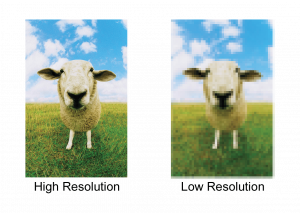
In a nutshell, your image resolution is how good (high resolution) or bad (low resolution) the quality of the image is.
I.e. blurry (pixelated) or clear.
An image is created by what is called pixels; a pixel is a tiny square that contains a colour. When you put a bunch of pixels together, they form a picture.
How do you determine if your image is high or low resolution?
Simple, if you enlarge an image to a bigger size and it goes blurry, it is a low resolution image. Low resolution means that there is not enough pixels in the image to enlarge it. Hence why it blurs because you are stretching the few pixels the image has to a larger size.
If you enlarge an image and the quality remains good and not blurry, it is a high resolution image. High resolution means that there is enough pixels for you to stretch the image to a bigger size.
With low resolution images, I advise to keep it the same size or make it smaller to retain the quality. NEVER make it bigger!
How does image resolution affect your business/marketing?
When working on any digital platform, you can sometimes get away with low resolution images but most of the time (speaking from my experience with clients) the quality of images are too pixelated and looks terrible on their website or social media platforms.
Investing a photographer, stock images or an someones high quality phone camera will help boost a businesses graphics. Remember, visually appealing images is what grabs and holds viewers interest and attention.
When it comes to your logo, ALWAYS ask your designer for a low res, high res and the open files for your logo design (and other graphics) so when you have to get another designer or printing company to do work for you, you can provide them with a range of options so the quality of your logo is never compromised.
When working non-digitally (like printing), it is extremely important to ensure your graphics are of high quality. The last thing you want is pixelated images on a bunch of adverts or brochures you spent allot of money printing.
In Conclusion,
I hope this post helped you gain an understanding on image resolution, always ask your designers and printers for help to understand what quality is needed for the job you require.
A lot of the time, you only get one shot to make a good impression on people. Make sure your graphics is the best quality it can be!